
Скачать Style Flocker – Бесплатный менеджер стилей InDesign для Windows & Mac
Обзор и руководство по быстрому старту
Style Flocker – это лёгкая, бесплатная утилита, разработанная специально для пользователей Adobe InDesign, которым необходимо создавать, упорядочивать и повторно использовать абзацные и символьные стили в нескольких документах. Впервые представлена в каталоге Design & Photography в 2007 году, программа собрала более 1 500 загрузок и остаётся надёжным помощником для дизайнеров‑верстальщиков, фрилансеров и издательств. Текущая версия (1.0.1) была обновлена 17 мая 2007 года и работает как на macOS (включая более старые версии Mac OS X), так и на Windows. Несмотря на возраст, основная функциональность программы – экспорт стилей в XML, импорт их обратно в InDesign и синхронизация библиотек стилей – остаётся актуальной для всех, кто хочет ускорить повторяющиеся задачи форматирования.
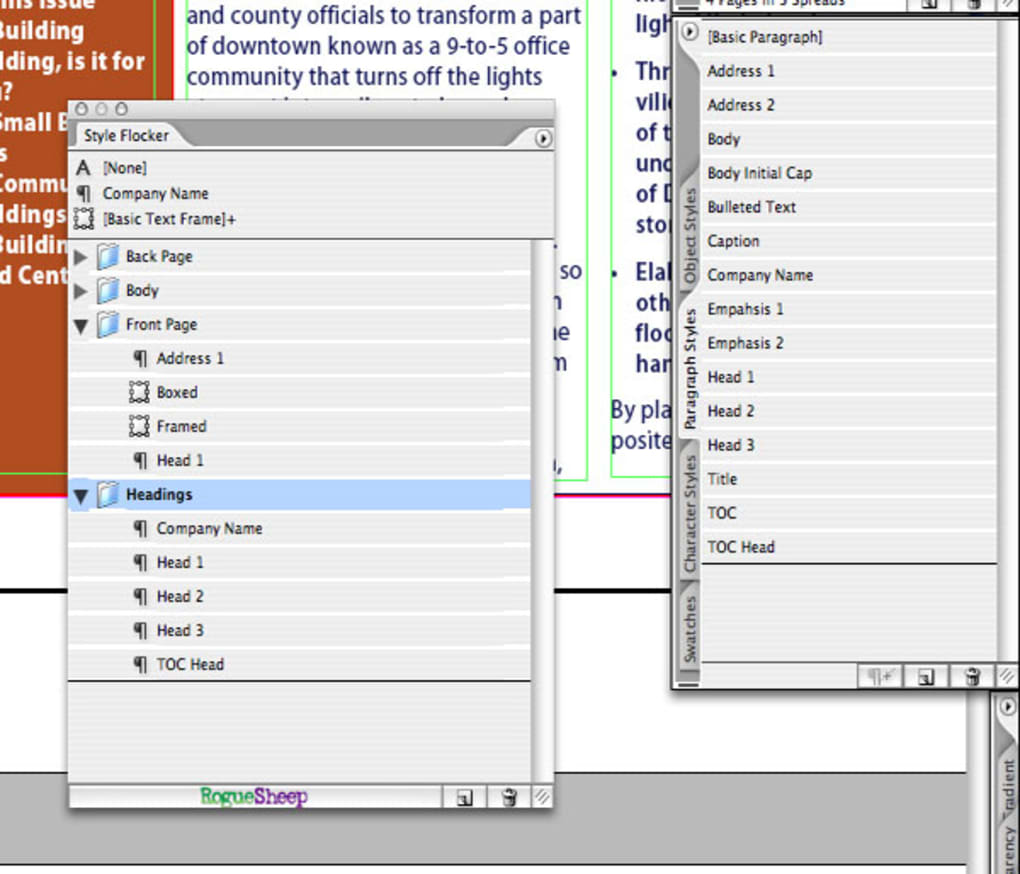
Начать работу со Style Flocker просто. После загрузки установочного файла запустите мастер установки, который проведёт вас через типичный трёхшаговый процесс: принять лицензионное соглашение, выбрать папку установки (по умолчанию требуется менее 10 МБ дискового пространства) и завершить установку. После установки запустите приложение; вы увидите чистый интерфейс, отражающий панель стилей InDesign. Чтобы экспортировать набор стилей, просто выберите нужные абзацные или символьные стили в InDesign, нажмите кнопку «Export to Style Flocker» и укажите папку назначения. Инструмент создаст XML‑файл, который можно импортировать в любой другой проект InDesign, обеспечивая согласованность во всей вашей издательской цепочке. Импорт работает аналогично – укажите существующий XML‑файл, просмотрите содержащиеся стили и нажмите «Import». Процесс безопасен, так как формат XML не исполняет код, а приложение никогда не требует подключения к интернету, защищая конфиденциальность ваших дизайнерских ресурсов.
Поскольку Style Flocker бесплатен, скрытых платежей или подписок нет. Разработчик предоставляет один пакет загрузки, включающий как Windows‑исполняемый файл (.exe), так и macOS‑пакет (.app). Пользователи также могут воспользоваться кратким онлайн‑руководством, в котором объясняются расширенные возможности, такие как пакетный экспорт и разрешение конфликтов стилей. В целом Style Flocker предлагает бесплатное, малообслуживаемое решение для дизайнеров, желающих упорядочить стили InDesign без покупки дорогих сторонних плагинов.
Мощные функции Style Flocker
- Export & Import XML Style Files: Seamlessly transfer paragraph and character styles between InDesign documents using a clean XML format.
- Batch Processing: Select multiple style groups at once and export them in a single operation, saving hours of manual work.
- Style Conflict Resolver: When importing, the tool highlights duplicate or conflicting style names and lets you choose to overwrite, rename, or skip.
- Cross‑Platform Support: Fully compatible with both macOS (including legacy Mac OS X) and Windows, ensuring teams on different operating systems can share style libraries.
- Lightweight Installer: The entire application occupies less than 10 MB, leaving ample free space for larger design assets.
- Secure, Offline Operation: No internet connection is required; all style data stays on your local machine, protecting confidential project information.
- Simple UI Aligned with InDesign: The interface mirrors InDesign’s native style panels, reducing the learning curve for new users.
- Free and No‑Ads Policy: The program is completely free to download and use, with no hidden advertisements or trial periods.
- Automatic Version Check: Although updates are infrequent, the app can check for newer releases and notify you when a newer version becomes available.
Each feature is designed with the workflow of a professional designer in mind. For example, the batch processing capability allows a studio handling dozens of magazine layouts to export a master style set once and then apply it to all new issues without recreating styles manually. The conflict resolver is particularly valuable when multiple designers work on the same project and unintentionally create similarly named styles; Style Flocker presents a clear dialog that lets you keep the best version or rename conflicting entries, preserving the integrity of your design system.
Because the tool relies on standard XML, the exported files are human‑readable and can be edited with any text editor if you need to make quick adjustments outside of InDesign. This openness also means that developers can integrate Style Flocker into custom pipelines, such as automated build scripts that generate style libraries for large publishing houses. The combination of simplicity, cross‑platform reliability, and robust feature set makes Style Flocker a unique niche solution that fills a gap left by more expensive, feature‑bloat plugins.
System Compatibility, Pros and Cons
Style Flocker runs on macOS (including older Mac OS X versions) and Windows (XP, Vista, 7, and later). The program requires Adobe InDesign CS5 or newer to access the style APIs, but it does not depend on any additional runtime libraries, making it a hassle‑free addition to any design workstation.
Pros
- Completely free with no hidden costs.
- Very small download size; conserves disk space.
- Works offline, ensuring data privacy.
- Intuitive UI that mirrors InDesign, minimizing training time.
- Robust XML export/import that can be integrated into custom workflows.
- Cross‑platform support eliminates the need for separate Windows and Mac tools.
Cons
- Last major update was in 2007, so UI feels dated compared to modern plugins.
- No native support for InDesign’s newer Cloud‑based libraries.
- Lacks advanced features such as style versioning or cloud syncing.
- Documentation is limited to a brief online manual.
Overall Rating: 4 out of 5 stars
Style Flocker excels at what it promises—providing a free, reliable way to manage InDesign styles across projects. While the interface could benefit from a visual refresh, the core functionality remains solid and valuable for both freelancers and larger teams.
Frequently Asked Questions
Is Style Flocker compatible with the latest version of InDesign?
Yes. Style Flocker works with InDesign CS5 and newer, including the latest Creative Cloud releases. The tool uses InDesign’s public style APIs, which remain stable across versions.
Can I use Style Flocker on a Mac with Apple Silicon (M1/M2) chips?
The macOS bundle runs under Rosetta 2, so it works on Apple Silicon machines. Performance is comparable to native Intel builds, and the small footprint ensures smooth operation.
Do I need an internet connection to export or import styles?
No. All export and import actions happen locally. The XML files are stored on your hard drive, and no data is sent to external servers, keeping your design assets secure.
What file format does Style Flocker use for exported styles?
Exports are saved as plain‑text XML files. This format is both human‑readable and compatible with other design tools that support XML style definitions.
Is there any cost for future updates?
Style Flocker is completely free. The developer has stated that any future updates will also be released at no charge.
Conclusion – Download Style Flocker Today
For designers who spend countless hours recreating paragraph and character styles across multiple InDesign projects, Style Flocker offers a pragmatic, no‑cost solution that streamlines the process. Its lightweight footprint, cross‑platform support, and straightforward XML workflow make it an essential utility for anyone looking to boost productivity without investing in pricey plugins. While the interface could use a modern facelift and the feature set is intentionally simple, the reliability and security of an offline, ad‑free tool outweigh these minor drawbacks. If you’re ready to bring order to your style library and accelerate your layout workflow, click the download button below and start managing your InDesign styles with confidence.







